

In order for your credits from non-CIAT institutions to be applied to your official CIAT record, you will need to have all official transcripts sent directly from those institution(s) to CIAT.
Please note: Only transcripts sent directly from the other school to CIAT will be considered official.
Unofficial transcripts that you may have sent during the enrollment period cannot be applied to your official CIAT record.
You may have official transcripts sent via mail or online using a secure vendor. For electronic transcripts, please order them to be sent to records@ciat.edu. For hard copy official transcripts, please mail them to:
ATTN: Records Department
401 Mile of Cars Way, Suite 100, National City, CA 91950
We suggest sending your transcripts through an approved electronic vendor such as Parchment or National Student Clearinghouse to expedite the process. Keep in mind that electronic transcripts must be sent directly from the issuing institution. Also, note that hard copy official transcripts must be delivered sealed inside the original envelope. Transcripts issued to the student, faxed, or sent as an email attachment are not acceptable official documents.
Here is a walkthrough of how to submit transcripts through Parchment:
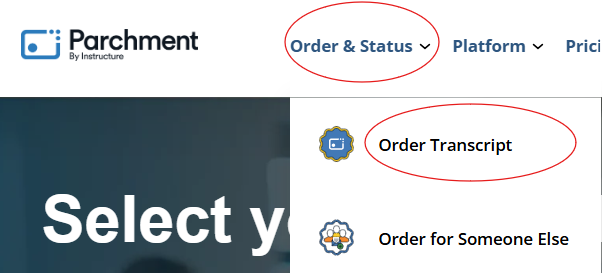
Navigate to the main Parchment site. Select “Order & Status”. From the drop-down menu that appears, click “Order Transcript”.
Search the Institution Name “California Institute of Applied Technology” in the search bar on Parchment and select the school:

Next, select the order option that applies to you and enter your email address:
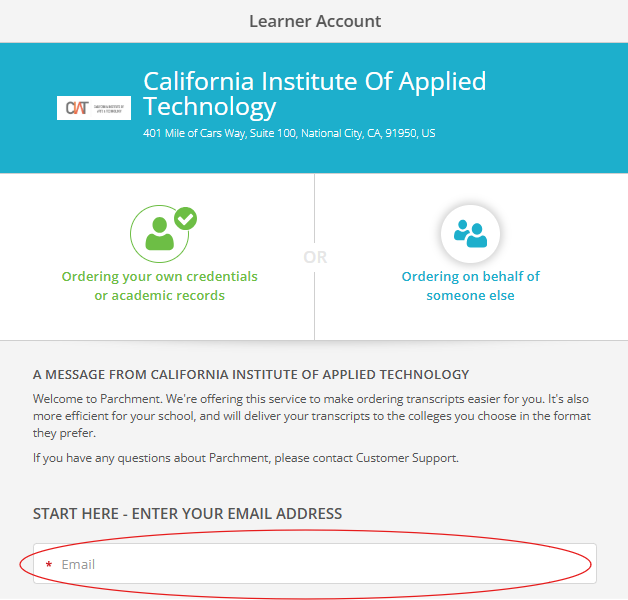
*Please note, if you already have an account with Parchment, it will have you login next. If you do not, it will have you create an account for parchment to continue with the order request.
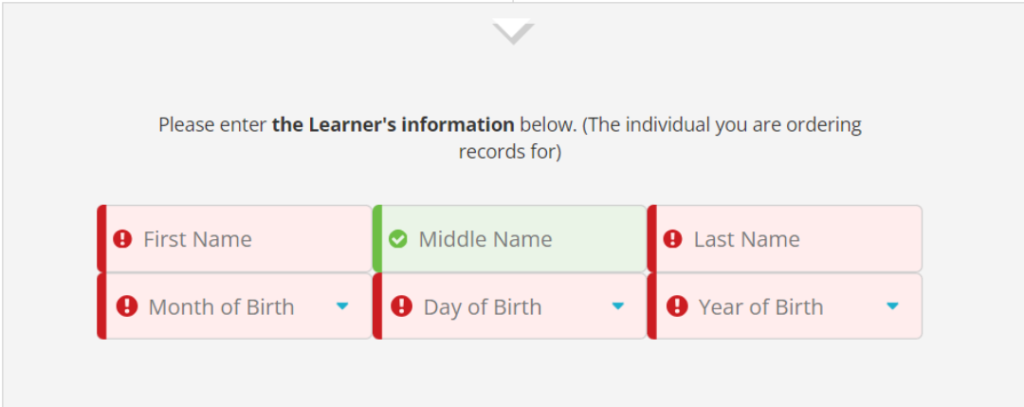
Once you have created your account and/or logged in, you will fill in the requested information:


401 Mile of Cars Way #100, National City, CA 91950
1717 Louisiana Blvd., NE., Suite 208 Albuquerque, NM, 87110
California Institute of Applied Technology participates in the State Authorization Reciprocity Agreements.
© 2026 California Institute of Applied Technology | info@ciat.edu | (877) 559 - 3621 | Privacy Policy
California Institute of Applied Technology has shared ownership and management of two distinct institutions. California Institute of Applied Technology located in California, and California Institute of Applied Technology located in New Mexico.
GI Bill® is a registered trademark of the U.S. Department of Veterans Affairs (VA). More information about education benefits offered by VA is available at the official U.S. government website at https://www.benefits.va.gov/gibill. CIAT is approved to offer VA benefits. Financial aid is available for those who qualify.
* Students are encouraged to take certification exams while actively enrolled in their Bootcamp, Certificate or Degree program. Unlimited certification exam attempts expire 180 days after program completion. Select exams are not eligible for unlimited retakes - see certification exam policy for details. Industry certifications and/or courses may change at any time to address industry trends or improve student outcomes.
